Dell
Dell UltraSharp U3224KB

- 224 PPI Retina sharp on macOS
- 60 Hz Refresh rate
- 140W One-cable charging
- Thunderbolt 4 Daisy-chain capable
- 160 mm Height adjustment
- Built in Camera
Dell U3224KB 6K · 32″ · 224 PPI
Dell UltraSharp U3224KB Review: The Enterprise 6K Monitor for Mac
Parish Khan Research-based review 4 min read
RetinaDesk verdict
Excellent
IT departments deploying monitors for Mac Studios and MacBook Pros
An enterprise-ready 6K. Dell adds a 4K IR webcam with beamforming mics, strong speakers, 140W Thunderbolt 4 charging, 2.5GbE Ethernet and a huge hub, backed by next-business-day on-site support. At $2,399 it costs $1,100 more than the ASUS PA32QCV, which makes sense when a company is paying.
Will it work with your Mac? Check against Apple's own limits in five seconds.Launch price
$2,399
Amazon prices move often; check today's.
As an Amazon Associate, RetinaDesk earns from qualifying purchases. It never changes your price.
The 30-second verdict
What you get, what you give up, and who it's for.
Why you'll love it
- 6144 × 3456 at 31.5 inches (224 PPI), the highest resolution in the 6K field alongside LG and Kuycon
- IPS Black panel rated at 2,000:1 static contrast
- VESA DisplayHDR 600
- 8MP 4K IR webcam with beamforming mics and a 5 m focus range
- 14W-per-channel stereo speakers, the strongest audio among 6K monitors
- Thunderbolt 4 with 140W charging keeps a 16-inch Max MacBook Pro full under load
- Large hub: four USB-A, two USB-C and 2.5 Gigabit Ethernet
- Hardware KVM for Mac and Windows desks
- Three years of next-business-day on-site service with Premium Panel Exchange
Think twice about
- $2,399, about $1,100 more than the ASUS PA32QCV
- Corporate grey design with sharp angles
- Dell PremierColor calibration rather than the Calman Verified badge creatives look for
- Mini DisplayPort input needs an adapter for standard DisplayPort cables
- Two of three labs measured contrast well below Dell's 2,000:1 claim
Buy it if you're
- IT departments deploying monitors for Mac Studios and MacBook Pros
- Offices that mix Mac and Windows machines
- People on video calls all day who want a high-quality built-in webcam
- 16-inch Max MacBook Pro owners who need 140W from one cable
Skip it if you're
- Individual buyers on a budget, who should look at the ASUS PA32QCV
- Creative professionals who want Calman Verified calibration
- Home setups where design matters
- HDR grading, given its mid-tier DisplayHDR 600
Mac compatibility
Will the Dell UltraSharp U3224KB work with your Mac?
Pick your Mac and we'll check it against Apple's own display limits for that exact model.
1 · Your Mac
2 · Its chip
We remember your Mac on this device only, so every RetinaDesk review checks it for you.
What we check
- Native 6K resolution
- Refresh rate
- How many at once
- One-cable charging
- Which port to use
Source: Apple's display-support pages for every Apple silicon Mac, as used by our external display tool.
Dell UltraSharp U3224KB compatibility at a glance, by Mac
Works fully
- MacBook Air 13" (M1, M2, M3, M4, M5)
- MacBook Air 15" (M2, M3, M4, M5)
- MacBook Pro 13" (M1, M2)
- MacBook Pro 14" (M1 Pro, M1 Max, M2 Pro, M2 Max, M3, M3 Pro, M3 Max, M4, M4 Pro, M4 Max, M5, M5 Pro, M5 Max)
- MacBook Pro 16" (M1 Pro, M1 Max, M2 Pro, M2 Max, M3 Pro, M3 Max, M4 Pro, M4 Max, M5 Pro, M5 Max)
- Mac mini (M1, M2, M2 Pro, M4, M4 Pro, M6, M5 Pro)
- Mac Studio (M1 Max, M1 Ultra, M2 Max, M2 Ultra, M4 Max, M3 Ultra, M5 Max, M5 Ultra)
- iMac 24" (M1 (2-port), M1 (4-port), M3 (2-port), M3 (4-port), M4 (2-port), M4 (4-port))
- Mac Pro (M2 Ultra)
Won't work
- MacBook Neo (A18 Pro): Can't run 6K
From Apple's published display limits and charger wattages for each Mac. Pick yours above for the full detail.
Front 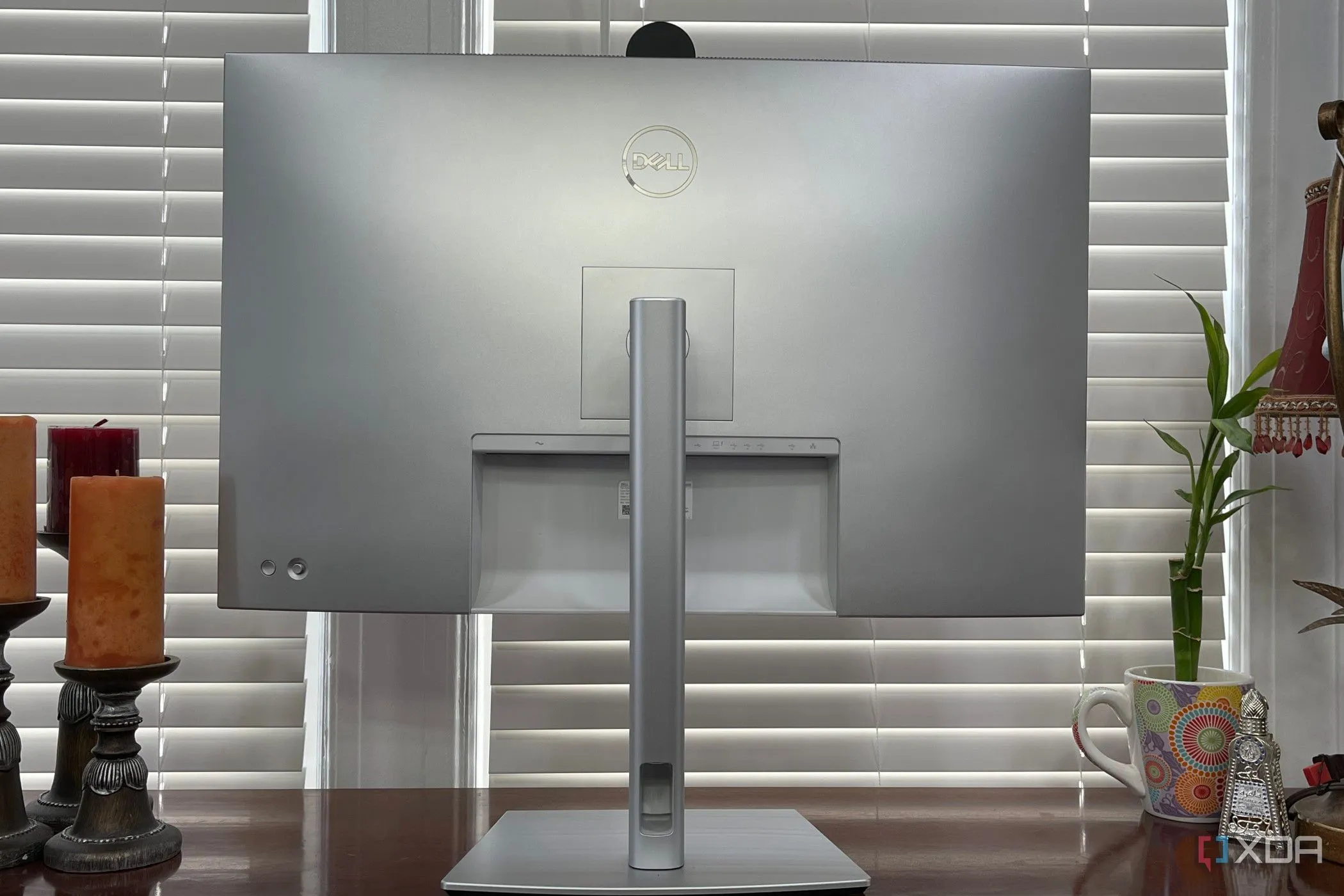 Back & ports
 How it stacks up
Where the Dell UltraSharp U3224KB lands against its rivals.
Manufacturer specs for every monitor we cover. Further right is better. Tap a dot to open that review.
Price (MSRP)
4th of 4
$2,399
Rated SDR brightness
2nd of 4
450 nits
Refresh rate
Same across all 4
60 Hz
Every monitor here matches it, so this one is a level playing field.
Laptop charging
Best of 4
140W
Stand height travel
Best of 4
160 mm
Pixel density
Best (tied) of 4
224 PPI
Price (MSRP)
9th of 10
$2,399
Rated SDR brightness
5th of 10
450 nits
Refresh rate
3rd of 10
60 Hz
Laptop charging
Best (tied) of 10
140W
Stand height travel
Best of 10
160 mm
Pixel density
Best (tied) of 10
224 PPI
The verdict, up top
IT departments will like the Dell UltraSharp U3224KB. It is a 32-inch 6K monitor with next-business-day on-site support, a 4K IR webcam and beamforming microphones that save buying separate conferencing gear, 14W-per-channel speakers, 2.5 Gigabit Ethernet and a port selection that removes the need for a dock. Its Thunderbolt 4 port charges at 140W, enough for any MacBook Pro, including a 16-inch M5 Max under load.
For individuals paying their own money, it is expensive. At $2,399 it costs about $1,100 more than the ASUS PA32QCV for extras most people won’t use. For companies it is a different story, and the advantages over consumer-focused alternatives are real.
The enterprise case
The U3224KB’s value is less in the panel than in everything around it:
- Support. Dell ProSupport offers next-business-day on-site service with a technician you can call. ASUS and BenQ don’t offer anything comparable. If a panel fails mid-project, Dell sends someone.
- Panel guarantees. Premium Panel Exchange and a zero-bright-pixel guarantee mean a single bright pixel qualifies for replacement, where standard policies require several.
- Compliance. EPEAT, Energy Star, RoHS, BFR- and PVC-free and other certifications that corporate procurement checks for are all documented in clear datasheets.
If you manage a studio of Mac Studios, those things are worth more than a spec-sheet comparison suggests.
The panel
Dell’s IPS Black technology produces deeper blacks than conventional IPS, with a rated 2,000:1 contrast against the usual 1,000:1. It is not Mini-LED and has no local dimming, but blacks look noticeably better in a dim room. Independent results are mixed: brightness and gamut beat Dell’s claims, but two of three labs measured contrast meaningfully below 2,000:1 (see the attributed figures below).
Colour covers 99% DCI-P3, 100% Rec.709 and 100% sRGB, with Delta E under 2 after calibration. Resolution is 6144 × 3456, slightly higher than the ASUS PA32QCV and the Pro Display XDR at 6016 × 3384, giving 224 PPI against 218. macOS renders both at 2×, so in practice text looks the same. Dell shares this resolution with the LG UltraFine evo and the Kuycon G32P, which costs about $700 less.
Dell rates the panel at 450 nits typical and 600 nits peak in HDR, which is adequate for most offices but not the brightest option for a desk facing a sunny window.
The integrated camera
The standout feature is the 4K IR camera in the top bezel:
- 8 megapixels, 3840 × 2160 at 30 fps
- Windows Hello face sign-in on Windows; a standard UVC webcam on macOS
- Dual beamforming microphones with noise reduction
- Physical privacy shutter
- Adjustable field of view and up to 5 m focus range for small meeting rooms
That saves $150 to $300 on an external webcam and keeps the desk tidy, which is especially handy in offices where people move between Macs and Windows laptops.
Ports and charging
Thunderbolt 4 with 140W is one of the best reasons to buy it. It charges every MacBook Pro at full speed, including the 16-inch M5 Max. The ASUS PA32QCV’s 96W is fine for a 14-inch Pro chip but can fall behind a 16-inch Max under sustained load. Our cable bandwidth calculator shows exactly what each connection can carry.
The hub adds four USB-A 3.2 Gen 2 ports, two USB-C 3.2 Gen 2 ports, 2.5 Gigabit Ethernet, an HDMI 2.1 input, a Mini DisplayPort 2.1 input and a Thunderbolt 4 downstream port for daisy-chain. A hardware KVM switches between a Mac and a Windows machine without swapping cables. It is about as complete a port selection as any monitor offers, and the U3224KB needs no external dock.
Mac compatibility
Every Apple silicon Mac drives the U3224KB at full 6K 60 Hz over Thunderbolt. On Max-chip Mac Studios, use a rear Thunderbolt port: the front USB-C ports don’t carry video. To plan a multi-monitor desk, check your Mac in our external display support tool.
Who should buy it
- IT departments that deploy Mac Studios or MacBook Pros
- Offices that mix Mac and Windows machines
- Anyone with a company purchasing budget
- People who need a strong webcam for all-day video calls
- Desks that want wired 2.5GbE Ethernet through the monitor
Who should buy something else
- Individual buyers paying out of pocket should get the ASUS PA32QCV
- Thunderbolt 5 Mac owners should look at the LG UltraFine evo 32U990A: the same 6144 × 3456 resolution with native Thunderbolt 5 for $400 less
- Creatives who prefer Calman Verified calibration should consider the ASUS
- If you already own a dock and just want the panel, the Kuycon G32P hits the same resolution for about $1,699
- Buyers in countries without Dell ProSupport lose much of the reason to pay extra
The bottom line
The U3224KB is a well-specified enterprise monitor that happens to be excellent on a Mac. If you are paying for it yourself, you are paying about $1,100 extra for features you may never use. If your employer is paying, it is an excellent choice with real advantages in camera, ports, charging and support. Compare it directly in ASUS PA32QCV vs Dell U3224KB and Dell U3224KB vs LG UltraFine evo, or see the full best 6K monitors for Mac Studio guide.
The bottom line
Dell UltraSharp U3224KB: excellent
An enterprise-ready 6K. Dell adds a 4K IR webcam with beamforming mics, strong speakers, 140W Thunderbolt 4 charging, 2.5GbE Ethernet and a huge hub, backed by next-business-day on-site support. At $2,399 it costs $1,100 more than the ASUS PA32QCV, which makes sense when a company is paying.
$2,399
launch price · Amazon's price changes often
As an Amazon Associate, RetinaDesk earns from qualifying purchases.
Independent lab measurements
What the Dell UltraSharp U3224KB actually measures
Dell claims 450 nits, 2000:1 and 99% DCI-P3. Three labs measured the panel and the picture is mixed: brightness and gamut beat the claim, but the IPS Black contrast figure came in meaningfully below Dell's 2000:1 in two of the three tests. Every figure below is attributed to the lab that measured it.
Maximum SDR brightness
524 nits
+16% vs Dell's 450
3 labs · 488–524
Primary: PCWorld
Native contrast ratio
1,710:1
−14% vs Dell's 2,000:1
3 labs · 1,500–1,710:1
Primary: PCWorld
DCI-P3 coverage
100%
+1% vs Dell's 99%
3 labs · 94–100%
Primary: Tom's Hardware
HDR peak brightness
620 nits
+3% vs Dell's 600
3 labs · 617–669
Primary: Tom's Hardware
Measured colour gamut coverage
Measured Dell claims
Claimed 100% · PCWorld
Claimed 99% · Tom's Hardware measured full 100% coverage · PCWorld
MonitorNerds measured 92% too — not a claimed figure · PCWorld
Brightness & contrast
- 16-point ANSI contrast "It doesn't get better than that for any IPS panel"
- 1,439:1 Tom's Hardware
- Contrast, calibrated to 200 nits Calibration does not alter the ratio
- 1,500:1 Tom's Hardware
- Black level At maximum brightness
- 0.330 nits T3
- HDR contrast with field dimming
- 12,523:1 Tom's Hardware
Colour accuracy
- Average error out of box Factory calibration, no adjustment
- 0.99 ΔE MonitorNerds
- Average error after calibration Calibrite Display Plus profile
- 0.40 ΔE MonitorNerds
- Input lag At 60 Hz
- 10 ms MonitorNerds
- Gamma Precisely on the 2.2 target
- 2.2 PCWorld
- White point Against a 6500 K target — a touch cool
- 6,800 K PCWorld
Where these numbers come from
RetinaDesk does not run a photometry lab. Every figure above is an instrumented reading published by the lab named beside it, collected here so you can compare them against Dell's claimed specification in one place. Each lab's full review is linked below, so you can check any number at its source. Our own contribution for the Dell UltraSharp U3224KB is the Mac side: which Macs drive it at native resolution, over which port and cable, described in our methodology.
- Tom's Hardware
Christian Eberle · Portrait Displays Calman
- PCWorld
Colorimeter (model not disclosed)
- T3
Richard Baguley · Datacolor SpyderX
- MonitorNerds
Datacolor SpyderV Elite + Calibrite Display Plus
Compare the Dell UltraSharp U3224KB
Head-to-head with the monitors most shoppers cross-shop against.
Pick any other monitor from our catalog and see the spec-by-spec matchup instantly.
Before you buy
Check your Mac and your cable.
Three quick checks that determine whether the Dell UltraSharp U3224KB will actually run at its full resolution on your specific Mac.
Mac PPI Calculator & Retina Checker
See how the 6K panel at 32" will actually render on macOS, and how it compares to Retina targets.
Open calculatorMac Cable Bandwidth Calculator
Confirm your USB-C, HDMI, DisplayPort or Thunderbolt cable can carry 6K at 60Hz from your Mac.
Check my cableMac External Display Support
Check whether your exact Apple Silicon Mac (M1 through M6) can drive the Dell UltraSharp U3224KB at native resolution.
Look up my Mac