ASUS
ASUS ProArt PA27JCV

- 218 PPI Retina sharp on macOS
- 60 Hz Refresh rate
- 96W One-cable charging
- USB-C Connection
- 130 mm Height adjustment
- None Camera
ASUS PA27JCV 5K · 27″ · 218 PPI
ASUS ProArt PA27JCV Review: The Cheapest True 5K for Mac
Parish Khan Research-based review 3 min read
RetinaDesk verdict
Excellent
First-time Retina monitor buyers on a tight budget
The budget 5K that opened a new price tier. 218 PPI Retina density, 99% DCI-P3 and 95% Adobe RGB, Calman Verified Delta E under 2, DisplayHDR 500 and 96W USB-C charging for $799. You give up Thunderbolt, a camera and premium build, but it is the cheapest legitimate Retina monitor for Mac.
Will it work with your Mac? Check against Apple's own limits in five seconds.Launch price
$799
Amazon prices move often; check today's.
As an Amazon Associate, RetinaDesk earns from qualifying purchases. It never changes your price.
The 30-second verdict
What you get, what you give up, and who it's for.
Why you'll love it
- The lowest-priced true 5K monitor for Mac, under $800
- Full 5120 × 2880 resolution at 218 PPI, with no compromise on sharpness
- VESA DisplayHDR 500 with HDR10
- 99% DCI-P3, 95% Adobe RGB and 100% sRGB at 10-bit colour depth
- Calman Verified factory calibration at Delta E under 2
- 96W USB-C charging covers a 14-inch MacBook Pro over one cable
- Matte LuxPixel anti-glare coating with a paper-like finish
- Fully adjustable stand with 130 mm of height travel
- Three-year warranty with a zero bright dot guarantee
Think twice about
- No Thunderbolt: USB-C DisplayPort Alt Mode only, so no daisy-chain
- 2W stereo speakers are too weak for anything beyond system sounds
- No built-in webcam
- 1,500:1 contrast is typical IPS, without deep blacks
- Plain plastic design won't impress on a client-facing desk
Buy it if you're
- First-time Retina monitor buyers on a tight budget
- Students and junior developers with a MacBook
- A second 5K screen in a multi-monitor setup
- Monitor-arm users who don't care about the stand
- Anyone who wants HDR preview at this price
Skip it if you're
- Anyone who needs Thunderbolt daisy-chain for two monitors from one port
- Buyers who want a complete desk package with webcam and speakers
- Brand-conscious studios and client-facing desks
Mac compatibility
Will the ASUS ProArt PA27JCV work with your Mac?
Pick your Mac and we'll check it against Apple's own display limits for that exact model.
1 · Your Mac
2 · Its chip
We remember your Mac on this device only, so every RetinaDesk review checks it for you.
What we check
- Native 5K resolution
- Refresh rate
- How many at once
- One-cable charging
- Which port to use
Source: Apple's display-support pages for every Apple silicon Mac, as used by our external display tool.
ASUS ProArt PA27JCV compatibility at a glance, by Mac
Works fully
- MacBook Air 13" (M1, M2, M3, M4, M5)
- MacBook Air 15" (M2, M3, M4, M5)
- MacBook Pro 13" (M1, M2)
- MacBook Pro 14" (M1 Pro, M1 Max, M2 Pro, M2 Max, M3, M3 Pro, M3 Max, M4, M4 Pro, M4 Max, M5, M5 Pro, M5 Max)
- Mac mini (M1, M2, M2 Pro, M4, M4 Pro, M6, M5 Pro)
- Mac Studio (M1 Max, M1 Ultra, M2 Max, M2 Ultra, M4 Max, M3 Ultra, M5 Max, M5 Ultra)
- iMac 24" (M1 (2-port), M1 (4-port), M3 (2-port), M3 (4-port), M4 (2-port), M4 (4-port))
- Mac Pro (M2 Ultra)
Works, with a catch
- MacBook Pro 16" (M1 Pro, M1 Max, M2 Pro, M2 Max, M3 Pro, M3 Max, M4 Pro, M4 Max, M5 Pro, M5 Max): 96W charging, slightly short
Won't work
- MacBook Neo (A18 Pro): Can't run 5K
From Apple's published display limits and charger wattages for each Mac. Pick yours above for the full detail.
Front 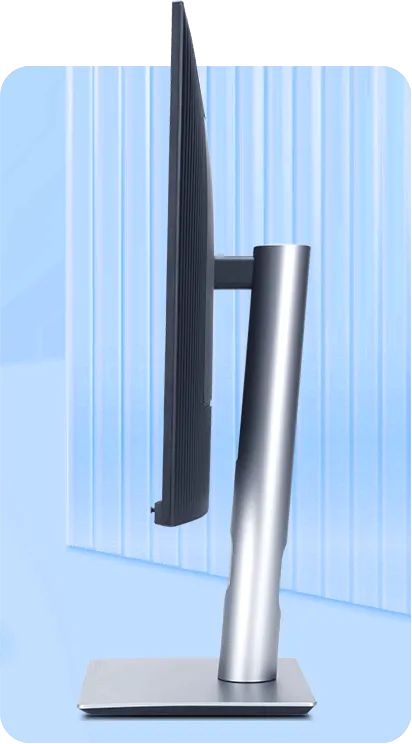 Close-up
 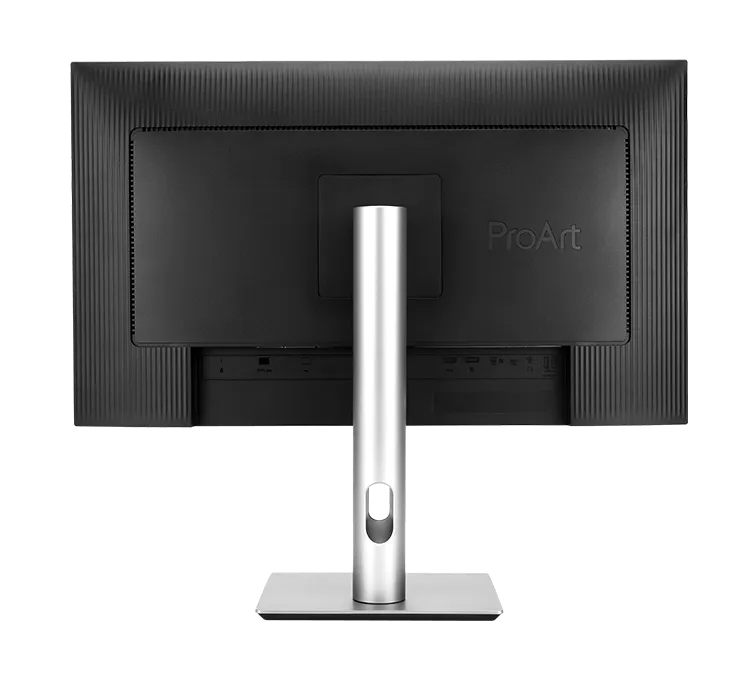 Back & ports
 How it stacks up
Where the ASUS ProArt PA27JCV lands against its rivals.
Manufacturer specs for every monitor we cover. Further right is better. Tap a dot to open that review.
Price (MSRP)
Lowest of 6
$799
Rated SDR brightness
5th of 6
400 nits
Refresh rate
3rd of 6
60 Hz
Laptop charging
2nd of 6
96W
Stand height travel
3rd of 6
130 mm
Pixel density
Same across all 6
218 PPI
Every monitor here matches it, so this one is a level playing field.
Price (MSRP)
Lowest of 10
$799
Rated SDR brightness
8th of 10
400 nits
Refresh rate
3rd of 10
60 Hz
Laptop charging
4th of 10
96W
Stand height travel
4th of 10
130 mm
Pixel density
4th of 10
218 PPI
The verdict, up top
ASUS broke the price floor for 5K Mac monitors. At $799, the PA27JCV is the cheapest 27-inch 5K at 218 PPI we cover; the next cheapest costs $200 more. The spec sheet is also surprisingly complete: DisplayHDR 500, 99% DCI-P3, Calman Verified factory calibration at Delta E under 2, 96W USB-C charging, 10-bit colour and an anti-glare coating.
The compromises are real. There is no Thunderbolt, the speakers are weak and there is no camera. The panel itself is genuinely pro grade, though. If you want a Retina-density display but don’t have Studio Display money, this is the place to start.
Why 5K matters at 27 inches
At 27 inches, only one resolution lets macOS render at a clean 2× Retina scale: 5120 × 2880. The PA27JCV delivers exactly that, at 218 PPI, so text looks as sharp as a MacBook Pro’s built-in screen. A 27-inch 4K monitor, by comparison, sits at about 163 PPI and forces macOS to choose between slightly soft text and oversized UI. Plug the numbers into our PPI calculator to see the difference.
What you get
Colour. ASUS calibrates every ProArt unit at the factory to Calman Verified targets and includes a pre-calibration report in the box. Coverage is 99% DCI-P3, 100% sRGB and 95% Adobe RGB at 10-bit colour depth. That is a professional colour setup, and the Adobe RGB figure makes it a good fit for print work.
HDR. DisplayHDR 500 certification means 500 nits peak brightness with VESA-verified HDR10 support. It is not reference-grade HDR, which starts at DisplayHDR 1000 and costs far more, but it works for HDR preview and HDR-aware editing. Independent labs measured the panel well above its 400-nit SDR spec, by more than 40% (see the lab figures below).
Ports. USB-C with DisplayPort Alt Mode carries the picture, data and 96W of charging, enough for a single-cable MacBook desk. HDMI 2.1 and DisplayPort 1.4 inputs take a second source such as a PS5, an Apple TV or another Mac, and an Auto KVM switches your keyboard and mouse between machines. The hub adds three USB-A ports and one USB-C port.
Stand. 130 mm of height adjustment, full portrait rotation, swivel, tilt and a 100 × 100 mm VESA mount.
What you don’t get
Thunderbolt. The PA27JCV uses USB-C with DisplayPort Alt Mode instead. For a single monitor on a single MacBook that is not a big issue, since one cable still does everything. But you cannot daisy-chain a second 5K, and the USB hub has less bandwidth headroom than a Thunderbolt 4 hub would. If a two-5K desk is the plan, look at the MA270S or PD2730S.
Speakers. The 2W stereo speakers are fine for alerts and little else. Plan on headphones or desktop speakers.
Camera. There is none, so add $100 to $200 for an external webcam if you need one.
Mac compatibility
Every Apple silicon Mac can drive the PA27JCV at full 5K 60 Hz over USB-C. The 96W charging covers 14-inch MacBook Pro models comfortably; a 16-inch Max under sustained load can draw more. To check how many external displays your Mac supports in total, use our external display support tool.
Who should buy it
- Mac owners who want Retina sharpness on a tight budget
- Students and junior developers with a MacBook
- Anyone adding a second 5K screen without doubling the cost
- Monitor-arm users who don’t care what stand comes in the box
- HDR preview work where DisplayHDR 500 is enough
Who should pay more
- For documented colour accuracy with a printed report and Pantone validation, get the BenQ PD2730S
- For Thunderbolt docking and daisy-chain, get the BenQ MA270S
- For a built-in camera, microphones and good speakers, get the Apple Studio Display
The bottom line
The PA27JCV is the cheapest way to get a proper Retina monitor for your Mac. If you want pixel-perfect text and accurate P3 colour and don’t care about brand, build or Thunderbolt, it is the right pick. Deciding between this and the MA270S? Read ASUS PA27JCV vs BenQ MA270S. Our best 5K monitors for MacBook Pro guide ranks every 218 PPI option.
The bottom line
ASUS ProArt PA27JCV: excellent
The budget 5K that opened a new price tier. 218 PPI Retina density, 99% DCI-P3 and 95% Adobe RGB, Calman Verified Delta E under 2, DisplayHDR 500 and 96W USB-C charging for $799. You give up Thunderbolt, a camera and premium build, but it is the cheapest legitimate Retina monitor for Mac.
$799
launch price · Amazon's price changes often
As an Amazon Associate, RetinaDesk earns from qualifying purchases.
Independent lab measurements
What the ASUS ProArt PA27JCV actually measures
ASUS publishes 400 nits, 1500:1 and 99% DCI-P3 for the PA27JCV. Two labs put instruments on the panel and both found it comfortably beats its own spec sheet on brightness — by more than 40%. Every figure below is attributed to the lab that measured it.
Maximum SDR brightness
565.8 nits
+41% vs ASUS's 400
2 labs · 565.8–584.6
Primary: Tom's Hardware
Native contrast ratio
1,574:1
+5% vs ASUS's 1,500:1
2 labs · 1,530–1,574:1
Primary: Tom's Hardware
DCI-P3 coverage
99.6%
+1% vs ASUS's 99%
Primary: KitGuru
HDR peak brightness
636 nits
+27% vs ASUS's 500
Primary: Tom's Hardware
Measured colour gamut coverage
Measured ASUS claims
Claimed 99% · KitGuru
Claimed 95% · KitGuru
No Quantum Dot layer, so BT.2020 is out of reach · KitGuru
Brightness & contrast
- Black level Maximum backlight, native mode
- 0.3596 nits Tom's Hardware
- Contrast, set to 200 nits
- 1,580:1 Tom's Hardware
- 16-point ANSI contrast
- 1,311:1 Tom's Hardware
- Contrast with dynamic dimming Dims the full image; does not raise peak output
- 5,235:1 Tom's Hardware
- Minimum brightness
- 22.7 nits KitGuru
Colour accuracy
- Grayscale error, Adobe RGB preset Best preset of the six tested
- 1.00 ΔE Tom's Hardware
- Grayscale error, DCI-P3 preset
- 0.92 ΔE KitGuru
- Colour error, DCI-P3 preset
- 1.59 ΔE KitGuru
- Grayscale error after calibration
- 0.53 ΔE KitGuru
- White point Against a 6500 K target; 6510 K after adjustment
- 6,217 K KitGuru
HDR performance
- HDR white luminance
- 636.0 nits Tom's Hardware
- HDR black level
- 0.3987 nits Tom's Hardware
- HDR sequential contrast Rises to 6,575:1 with dynamic dimming on
- 1,595:1 Tom's Hardware
Motion & uniformity
- Response time, black to white
- 16 ms Tom's Hardware
- Absolute input lag Better than nearly every 60 Hz monitor Tom's has tested
- 41 ms Tom's Hardware
- Black-field uniformity deviation Deviation from centre, no uniformity compensation
- 10.74% Tom's Hardware
Accuracy by picture mode
Measured by Tom's Hardware
| Mode | Grayscale ΔE | Gamma | Gamut ΔE | Gamut volume |
|---|---|---|---|---|
| Native (Display P3) | 1.44 | 2.16 | 1.10 | 99.48% |
| sRGB | 1.13 | 2.18 | 1.08 | 99.63% |
| Adobe RGB | 1.00 | 2.18 | 1.27 | 89.38% |
| DCI-P3 Cinema | 1.13 | 2.55 | 0.89 | 98.61% |
| Rec.709 | 1.16 | 2.37 | 1.94 | 99.68% |
| BT.2020 | 1.13 | 2.37 | 1.94 | 74.09% |
Every preset lands under 2ΔE for both grayscale and colour, which is below the roughly 3ΔE threshold where errors become visible — so the PA27JCV meets its claimed accuracy out of the box with no adjustment. The two low gamut-volume figures are hardware limits rather than calibration faults: without a Quantum Dot layer the panel cannot fill Adobe RGB or BT.2020.
Where these numbers come from
RetinaDesk does not run a photometry lab. Every figure above is an instrumented reading published by the lab named beside it, collected here so you can compare them against ASUS's claimed specification in one place. Each lab's full review is linked below, so you can check any number at its source. Our own contribution for the ASUS ProArt PA27JCV is the Mac side: which Macs drive it at native resolution, over which port and cable, described in our methodology.
- Tom's Hardware
Christian Eberle · Portrait Displays Calman
- KitGuru
Dominic Moass · X-Rite i1 Display Pro Plus + Calman Ultimate
Compare the ASUS ProArt PA27JCV
Head-to-head with the monitors most shoppers cross-shop against.
Pick any other monitor from our catalog and see the spec-by-spec matchup instantly.
Before you buy
Check your Mac and your cable.
Three quick checks that determine whether the ASUS ProArt PA27JCV will actually run at its full resolution on your specific Mac.
Mac PPI Calculator & Retina Checker
See how the 5K panel at 27" will actually render on macOS, and how it compares to Retina targets.
Open calculatorMac Cable Bandwidth Calculator
Confirm your USB-C, HDMI, DisplayPort or Thunderbolt cable can carry 5K at 60Hz from your Mac.
Check my cableMac External Display Support
Check whether your exact Apple Silicon Mac (M1 through M6) can drive the ASUS ProArt PA27JCV at native resolution.
Look up my Mac